A Technology Blog About Code Development, Architecture, Operating System, Hardware, Tips and Tutorials for Developers.

Showing posts with label THREAD. Show all posts

Tuesday, August 14, 2012

SPEED UP WITH MEMCACHED

Is your website running into performance bottlenecks? Does the database or backend feel like a really expensive resource, even though you’ve got a huge cluster set up to improve parallel processing? Read on to find out why you should be including Memcached, in your SOA based application.


Caching is a concept that almost all developers use in some form or the other in their applications. It’s basically about storing a piece of information in memory so that it can be retrieved quickly. Caching is mostly used for data that is accessed repeatedly, so that instead of calculating/retrieving from the disk repeatedly, which takes time, we can instead directly look it up in the cache, which is much faster. Caches can be used at multiple places in the application stack, so you have quite a few options when it comes to choosing where to cache, what to cache and how to cache.

Here are some of the techniques on how and where you might like to cache data:

  • Browser caching: As Web developers might be aware, some data can be cached on the client-side in the browser, like images, etc., so that they are automatically used when repeated requests for that resource are made.
  • Server-side caching: Data or objects can alternatively be cached on the server-side itself. This can either be a local server cache, a centralised caching server or a distributed cache.
  • Local database query cache: A good database caches the database queries or data internally, so as to improve the speed of looking up data as well as the performance of the database.
You may choose to implement a cache in one way or another, or you might use a combination of more than one technique to cache different types of data at separate levels. But more importantly, it is helpful to know whether you even need caching in the particular application/use-case you are thinking about.

Most people, in the process of implementing a cache, actually lose out because it was wrongly implemented. So the cache ends up slowing down the application, instead of speeding it up. Getting fancy software with fancy features doesn’t always make sense, but using even the modest ones in the right way, does.

Why you need Memcached

This discussion assumes that you have set up a cluster, and you want to implement caching. In this case, what happens if you start caching on each node independently? You will see that some nodes face memory issues, while others have quite a bit of memory left. Moreover, most of the data stored in their individual caches is redundant.

This calls for a centralised caching mechanism that makes sense, such that the data being cached is evenly distributed and unique for the whole cluster. And memcached is the right thing to choose.

It provides a solution in which the available memory in the cache is the sum of that on all nodes on which the Memcached instance is running. So if, for example, you have 10 nodes, with each being allocated 1 GB of memory for caching, you get a total of 10 GB of cache available for the whole cluster. Here are some features in Memcached that might lure you into using it within the context of your application:

  • Easy scalability: This feature is applicable for almost any software with the tag of “distributed”, but still, it is worth noting that Memcached needs minimal configuration to add a new node, with almost no special interconnect requirements. Your available memory in the cache just increases on the fly.
  • Hidden complexity: Memcached hides beneath it all the complexity associated with storing/retrieving the data from the cache. All we need to provide is the key associated with the data. The whole task of determining which node to store the data on, or to retrieve it from, is done by the Memcached client itself.
  • Minimal impact of a node failure: Even if a particular Memcached node does fail, it has almost no impact on the overall cache other than reducing the available memory, and a minor increase in the number of cache misses.
  • Flexible architecture: Memcached does not impose a restriction on all nodes to have a uniform cache size. So, some of your nodes with less physical memory can be set up to contribute perhaps only 512 MB to the cluster, while others may have 2 GB of memory dedicated for the Memcached instance. Apart from this, you can even run more than one instance of Memcached on a single node.
  • Multiple clients available: Memcached has client APIs available for various languages like PHP, C++, Java, Python, Ruby, Perl, .NET, Erlang, ColdFusion and even more.
  • Cross-platform: Memcached is available for a wide variety of platforms including Linux, BSD and Windows.
  • Multi-fetch: With the help of this feature, we can request values for more than one key at once, instead of querying them in a loop, one by one, which takes a lot of network round-trips.
  • Constant time functions: It takes the same amount of time to perform an operation in memory, whether it is a single key or a hundred. This corresponds to the Multi-fetch feature discussed before.


Saturday, August 11, 2012

THIRD PARTY MEMORY VS JVM MEMORY

Advantages of JVM memory over third party memory:

  1. JVM memory is faster (no network).
  2. JVM memory won’t require serialization, you have Java objects available to you.


Advantages of third party memory over JVM memory:

  1. It can be accessed by more than one application server, so your cache will be shared among all your app servers.
  2. It can be accessed by a variety of different servers, so long as they all agree on the key scheme and the serialization.
  3. It will discard expired cache values, so you get time-based invalidation.

Most of the technology selectors use either Memcached or Redis and there are several open source APIs with several languages to work with.

Related Topics:
THIRD PARTY MEMORY VS JVM MEMORY
MULTICORE ARCHITECTURE AND SOA
MULTITHREADING AND MULTICORE CPU
JAVA CONCURRENCY - PERFORMANCE BOOST
Java 5 Executor Framework
Concurrency: Callable and Future
Thursday, July 26, 2012

MULTICORE ARCHITECTURE AND SOA

7:09:00 PM Posted by Satish , , , , , 2 comments

With the success of multi-core architectures, enterprise applications derive benefits by executing the code in parallel. By definition, a multi-core microprocessor is one that combines two or more independent processors into a single package, often a single integrated circuit (IC). This architecture allows software applications to perform thread-level parallelism (chip-level multiprocessing) without including multiple microprocessors in separate physical packages. Now the question arises "why multi-core?" The answer lies in scalability, division of labor, specialization of labor, increased demands for performance and reduced power consumption.

Keeping aside hardware implications, we will look into the software implications of multi-core computing. The emergence of multi-core processor marks a revised thinking from a software perspective too. Applications won't be able to leverage processor enhancements unless software is highly concurrent. Code components which can be run concurrently benefit the most from multi-core architectures and even multiple applications can benefit a lot from multi-core architectures. Then you can run each virtual machine independently of others.

The basic steps in designing parallel applications are:

Partitioning: Decomposing the design into smaller chunks.
Communication: One chunk may require data from another chunk for its smooth execution. This information flow is specified in the communication phase.
Agglomeration: Obtain an algorithm to execute efficiently on a parallel computer. In this phase we combine or agglomerate tasks identified by the partitioning phase to provide a smaller number of useful tasks.
Mapping: Here, we specify where each task is to be executed.
The requirements of a business application do not lend themselves to either grid or parallel environment. 

The three main reasons are:

Order of processing: Business logic must be performed in a particular sequence to ensure the integrity of a business process. Each transaction waits for the previous transaction to be completed before it gets processed. This order of processing is difficult to maintain in a parallel grid environment.
Centrally shared resources: Applications have a centralized resource throughout the application. This creates a bottleneck.
Unpredictable behavior and resource needs: The size and processing requirements of business processes vary through out the day or within a given hour. This makes the division of an application into equal-sized blocks difficult, as well as the allocation of resources.

Multi-core computing in SOA

Service-oriented architectures are gaining popularity due to their inherent flexibility. SOA is an enterprise driven, complex, managed, standards-based and highly customizable architecture to enable maximum flexibility and control. SOA is compositional, meaning new applications are built by plugging services together. However, SOA solutions need higher computational resources due to the dependence upon XML-like or JSON-like languages. To truly benefit from SOA, a parallel processing approach to software design and implementation for SOA is required.

In context of SOA, multi-core computing can be exploited in the following areas


  • Scalability via distributed instances of the same logical service
  • Parallelizing service execution by detecting scope for parallelism
  • Multi-service processes/service orchestration scalability by distributing different services over different threads
  • Separation of different processes in SOA computing – marshalling, schema processing, validation, demarshalling into separate threads for maximizing throughputs for services

Parallel processing.

XML, SOAP, JSON and WSDL are major industry standards used to build SOA applications. However, processing of XML or JSON is computationally demanding and a number of optimization techniques have been developed to address the performance problem, but none of them are quite satisfactory. XML or JSON has turned out to be the major bottleneck for SOA applications. With the emergence of multi-core architectures, concurrent processing of XML or JSON could be one of the solutions to enhance the performance.

SOA can benefit from multi-core architectures, however a set of associated tools and programmer-usable artifacts should be created and made popular so that you do not lay the burden on programmer to create parallel XML or JSON processing code.

Friday, July 20, 2012

MULTITHREADING AND MULTICORE CPU

8:04:00 PM Posted by Satish , , , 1 comment
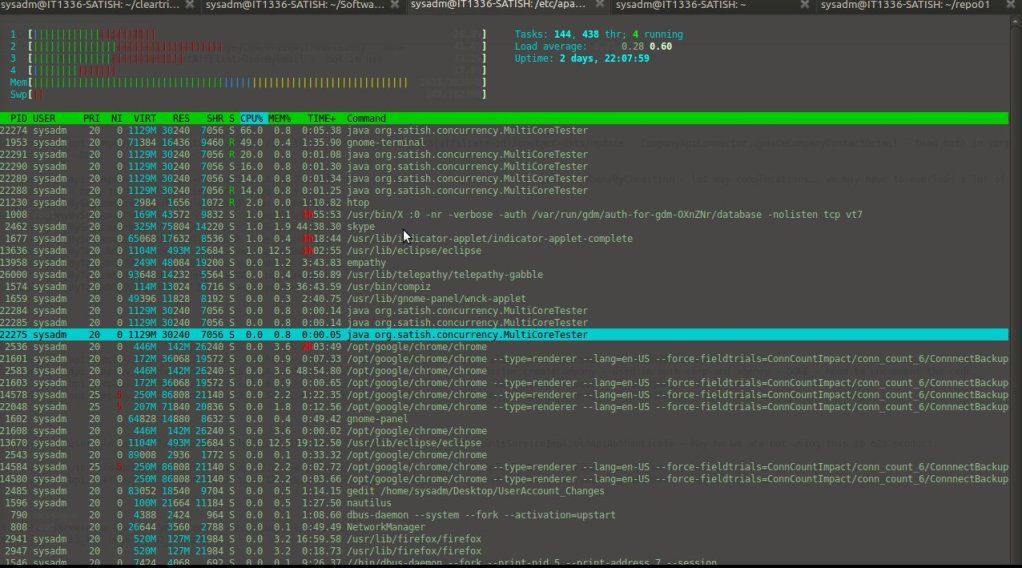
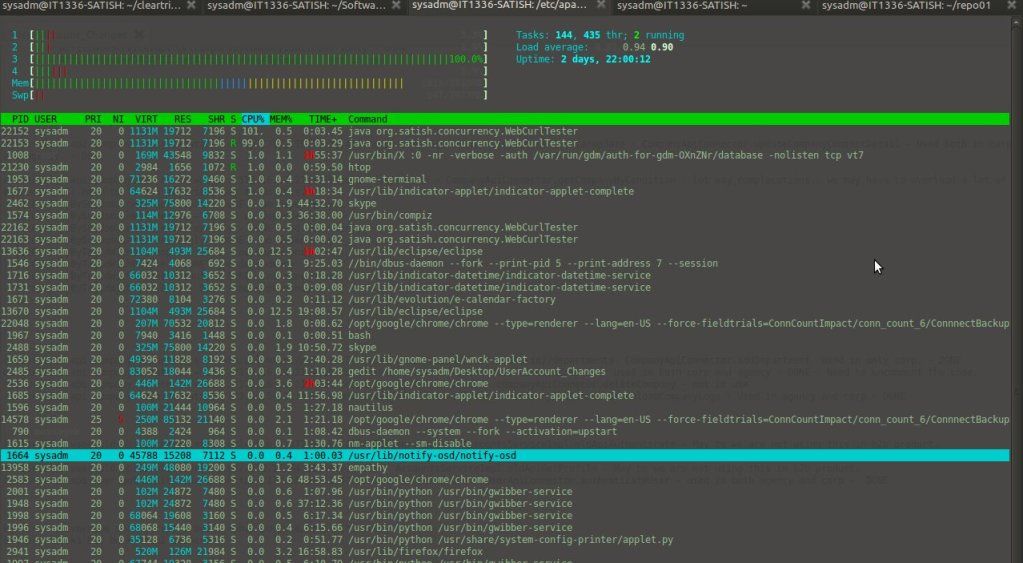
After posting the post JAVA CONCURRENCY - PERFORMANCE BOOST, I got a question "how it is going to work in single core CPU and multi core CPU". I was demonstrating the same set of source code for that and I found the program is utilizing only one core of the CPU. I took the help of "htop" tool in Ubuntu to monitor the CPU usage ("htop" is a wrapper around "top" and is having a user friendly UI). My be the purpose of that post was to demonstrate excecuting multiple tasks in parallel and specially the callback approach to save time.


CPU Usage with the program posted in above post:

cpu usage with htop
cpu usage using htop
CPU core no 3 is been utilized with 100% and rest all other cores are hardly used. After lot of google and several coding exercise, I came to the following understaning. I wrote a small program to demonstrate my finding.

Even a single CPU can do "multiple things at the same time" in a loose sense, but they are not truly in parallel. You can start 100 threads to run on a single core and they will get time slices during which each of them can run a few instructions, thus creating the impression that they are all executing at the same time.


The term threads usually covers three abstraction layers:

User threads are threads launched by applications and are mapped N:M to:
Kernel threads, which are threads managed by the operating system, mapped N:M to:
Hardware threads, which are the actual physical resources available.

Java threads are user threads. The 4 cores in your CPU count as hardware threads. Since the mapping is N:M across the layers, you can see that you can have several user threads mapped to a smaller number of hardware threads.

Now, having said this, there are generally two classes of thread activities, each with their own quirks:

I/O threads: these threads spend most of their time waiting on read/write operations from a stream and are blocked in the meantime (they are not scheduled for execution until an event occurs to wake them up). There are light on the CPU and a lot of them can run concurrently even on a single core.

Computational threads: these thread do a lot of number crunching and use the CPU to the maximum. Generally starting more than (2x the number of available cores) such threads is going to degrade performance, because the CPU has a limited number of functional units: ALUs, FPUs, etc.
The second class of threads above lets you really see the benefit or running a multithreaded java program on your quad-core CPU. Here is a simple example of a program that executes squaring of 1.000.000.000 numbers first sequentially and then in parallel using a thread pool with 4 threads:

package org.satish.concurrency;

import java.util.concurrent.ExecutorService;
import java.util.concurrent.Executors;
import java.util.concurrent.TimeUnit;

class ThreadTask implements Runnable {

    private int total = 0;

    public ThreadTask(int total) {
        this.total = total;
    }

    @Override
    public void run() {
        int value = 0;
        for(int i = 0; i < total; i++) {
            System.out.println(value);
            value = i * i;
        }
    }       
}

public class MultiCoreTester {

    public static void main(String[] args) throws InterruptedException {

        int total = 1000000000;

        long start = System.currentTimeMillis();
        long value = 0;
        for(int i = 0; i < total; i++) {
            value = i * i;
        }       
        long stop = System.currentTimeMillis();

        System.out.println((stop - start) + " ms");

        ExecutorService exec = Executors.newFixedThreadPool(4);
        start = System.currentTimeMillis();
        for(int i = 0; i < 4; i++) {
            exec.submit(new ThreadTask(total / 4));
        }
        exec.shutdown();
        exec.awaitTermination(10, TimeUnit.SECONDS);
        stop = System.currentTimeMillis();

        System.out.println((stop - start) + " ms");     
    }
}


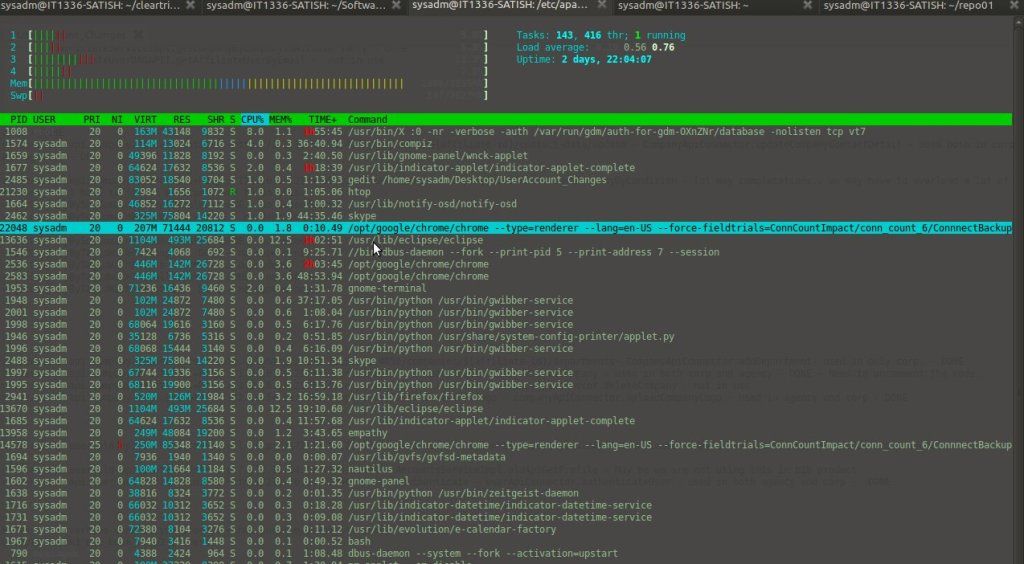
cpu usage before staring the program using htop
cpu usage after staring the program using htop
Before our program starts, all the four cores are hardy used. And once the program get started all the four cores are been used equally.

Thursday, July 12, 2012

JAVA CONCURRENCY - PERFORMANCE BOOST

10:27:00 PM Posted by Satish , , , No comments
Well after my last post about Executor Framework, I was desperate about finding the practical usage of the framework. I googled the whole day and found some of the search applications, where they used this approach to search in parallel. This approach drastically improves the time complexity!! no doubt. But one thing I noticed, after submitting the tasks the execution is waiting for a particular task to be completed in a queue, even if other tasks in the queue are ready with the result. It does not make much difference, where the execution is not performing any task on the result set. But in a large system, where the system performs 'n' number task on the result set, the new approach will end up boosting the time complexity. No more theory, let's get in to the code. First let me demonstrate the approach, that I googled.

So here I will curl multiple web sites and get the response. I have created a Callable implementation, where I am doing a curl to the web site. This is to give a sense how the search applications gather data from different sources.


package org.satish.concurrency;

import java.io.BufferedReader;
import java.io.IOException;
import java.io.InputStreamReader;
import java.net.MalformedURLException;
import java.net.URL;
import java.net.URLConnection;
import java.util.concurrent.Callable;

/**
 * This the callable implementation where I am curling the sites and send the
 * response back.
 * 
 * @author Satish Kumar
 * 
 */
public class WebCurlCallable implements Callable<String> {

    private String siteName;

    WebCurlCallable(String siteName) {
        this.siteName = siteName;
    }

    public String call() {
        StringBuffer response = new StringBuffer();
        try {
            URL url = new URL(this.siteName);
            URLConnection urlConnection = url.openConnection();
            BufferedReader in = new BufferedReader(new InputStreamReader(
                    urlConnection.getInputStream()));
            String inputLine;

            while ((inputLine = in.readLine()) != null)
                response.append(inputLine);
            in.close();
        } catch (MalformedURLException e) {
            // TODO Auto-generated catch block
            e.printStackTrace();
        } catch (IOException e) {
            // TODO Auto-generated catch block
            e.printStackTrace();
        }

        return this.siteName + " :::::: " + response.toString();

    }

    public String getSiteName() {
        return siteName;
    }

    public void setSiteName(String siteName) {
        this.siteName = siteName;
    }
}
WebCurlCallable.java

Now let me post the actual class from where, I will be creating a thread pool of 3 and will be assigning the task to the threads. If you notice, I will be collecting the Future objects in a list and in the next section I will be looping through the list and will be getting the result set from each Future object. Now in the loop, when the execution encounter the "future.get()", it will wait till completion of the associated task, even if other task in the list already finished and be ready with the result set. In my program I am not doing any post processing after getting the result set. But think of a situation, where you need to perform some task on that result sets. In that case it is a loss of CPU time, which could have been used for some processing.

package org.satish.concurrency;

import java.util.ArrayList;
import java.util.List;
import java.util.concurrent.Callable;
import java.util.concurrent.ExecutionException;
import java.util.concurrent.ExecutorService;
import java.util.concurrent.Executors;
import java.util.concurrent.Future;
 
public class WebCurlTesterInitial{
  
    /*Thread Pool Size*/
    private static final int NO_OF_THREADS = 3;

    /*List of sites to */
    private static final String siteNames[] = { "http://www.google.com",
            "http://www.yahoo.com", "http://www.touringheights.com",
            "http://satish-tech-talks.blogspot.in/", "http://www.facebook.com",
            "http://www.oracle.com", "http://www.amazon.com", "http://www.cnn.com", "http://www.about.com",
            "http://www.ebay.com", "http://www.download.com" };
     
    /** main thread. Alwyas there by default. **/
    public static void main(String[] args) {
        long startTime = System.currentTimeMillis();
        ExecutorService executor = Executors.newFixedThreadPool(NO_OF_THREADS); 
        List<Future<String>> list = new ArrayList<Future<String>>(10);  // provides facility to return results asynchronously
        
        for (int i = 0; i < siteNames.length; i++) {
            Callable<String> worker = new WebCurlCallable(siteNames[i]); // create worker threads
            Future<String> submit = executor.submit(worker); // add runnables to the work queue
            list.add(submit);
        }
   
      //process the results asynchronously when each thread completes its task
      for (Future<String> future : list) {
        try {
            System.out.println(future.get().substring(0, 60));
        } catch (InterruptedException e) {
            e.printStackTrace();
        } catch (ExecutionException e) {
           e.printStackTrace();
        }
      }
   
   
      executor.shutdown();
   
      System.out.println("Finished all threads in  : " + (System.currentTimeMillis() - startTime)/100 + " secs");
   }
 
}
WebCurlTesterInitial.java

Output:


http://www.google.com :::::: <!doctype html><html itemscope 
http://www.yahoo.com :::::: <!DOCTYPE html><html lang="en-IN
http://www.touringheights.com :::::: <!DOCTYPE html PUBLIC "
http://satish-tech-talks.blogspot.in/ :::::: <!DOCTYPE html 
http://www.facebook.com :::::: <!DOCTYPE html><html lang="en
http://www.oracle.com :::::: <!DOCTYPE html PUBLIC "-//W3C//
http://www.amazon.com ::::::   <!DOCTYPE html PUBLIC "-//W3C
http://www.cnn.com :::::: <!DOCTYPE HTML><html lang="en-US">
http://www.about.com :::::: <!doctype html>  <!--[if lt IE 7
http://www.ebay.com :::::: <!DOCTYPE html PUBLIC "-//W3C//DT
http://www.download.com :::::: <!DOCTYPE html>   <html lang=
Finished all threads in  : 105 secs


To utilize that time, I took the help of  FutureTaskFutureTask has a protected method which get triggered, once the task has been completed. By default the "done()" does not do anything. So I extended this class and implemented the "done()" method, the way I wanted. This worked as a callback method for me.


package org.satish.concurrency;

import java.util.concurrent.Callable;
import java.util.concurrent.ExecutionException;
import java.util.concurrent.FutureTask;

/**
 * I picked this implementation, because I what to write call back for each
 * task. FutreTask class has a method done(), which get fired once the task is
 * completed
 * 
 * @author Satish
 * 
 */
public class WebCurlFutureTax extends FutureTask<String> {

    public WebCurlFutureTax(Callable<String> callable) {
        super(callable);
        // TODO Auto-generated constructor stub
    }

    protected void done() {
        /* After completion logic */
        try {
            /*
             * Once the task is completed, get the result and print. User can
             * implement their own logic here i.e. to fire a event or to trigger
             * some other business logic.
             */
            System.out.println(this.get().substring(0, 60));
        } catch (InterruptedException e) {
            // TODO Auto-generated catch block
            e.printStackTrace();
        } catch (ExecutionException e) {
            // TODO Auto-generated catch block
            e.printStackTrace();
        }
    }
}

WebCurlFutureTax.java

package org.satish.concurrency;

import java.util.concurrent.Callable;
import java.util.concurrent.ExecutorService;
import java.util.concurrent.Executors;
import java.util.concurrent.Future;
import java.util.concurrent.ScheduledThreadPoolExecutor;

public class WebCurlTester {
    /*Thread Pool Size*/
    private static final int NO_OF_THREADS = 3;

    /*List of sites to */
    private static final String siteNames[] = { "http://www.google.com",
            "http://www.yahoo.com", "http://www.touringheights.com",
            "http://satish-tech-talks.blogspot.in/", "http://www.facebook.com",
            "http://www.oracle.com", "http://www.amazon.com", "http://www.cnn.com", "http://www.about.com",
            "http://www.ebay.com", "http://www.download.com" };

    public static void main(String[] args) {
        long startTime = System.currentTimeMillis();
        ExecutorService executor = Executors.newFixedThreadPool(NO_OF_THREADS); 

        for (int i = 0; i < siteNames.length; i++) {
            Runnable worker = new WebCurlFutureTax(
                    new WebCurlCallable(siteNames[i])); // create worker threads
            executor.submit(worker); // add runnables to the work queue
        }

        // This will make the executor accept no new threads
        // and finish all existing threads in the queue
        executor.shutdown();

        // Wait until all threads have completed
        while (!executor.isTerminated()) {

        }

        System.out.println("Finished all threads in  : " + (System.currentTimeMillis() - startTime)/100 + " secs");
    }
}

WebCurlTester.java

Output:

http://www.google.com :::::: <!doctype html><html itemscope 
http://www.touringheights.com :::::: <!DOCTYPE html PUBLIC "
http://satish-tech-talks.blogspot.in/ :::::: <!DOCTYPE html 
http://www.oracle.com :::::: <!DOCTYPE html PUBLIC "-//W3C//
http://www.yahoo.com :::::: <!DOCTYPE html><html lang="en-IN
http://www.facebook.com :::::: <!DOCTYPE html><html lang="en
http://www.about.com :::::: <!doctype html>  <!--[if lt IE 7
http://www.amazon.com ::::::   <!DOCTYPE html PUBLIC "-//W3C
http://www.cnn.com :::::: <!DOCTYPE HTML><html lang="en-US">
http://www.ebay.com :::::: <!DOCTYPE html PUBLIC "-//W3C//DT
http://www.download.com :::::: <!DOCTYPE html>   <html lang=
Finished all threads in  : 61 secs


Now you can see there is a big difference in time complexity. And till now my callback method does not do much things. Think of a situation where there is a post processing on the resultant. In that case a significant performance can be achieved. This approach can be used for tech solutions, where the CPU time of the distributed servers can be used efficiently. SOA is a great approach to implement concurrent solutions, where the module chunks are distributed among multiple servers. Problem statements can be designed to perform task in a parallel way instead of a serial way.

Wednesday, July 11, 2012

Java 5 Executor Framework

5:01:00 PM Posted by Satish , , , No comments

A thread pool is a collection of runnables with a work queue. The threads in the pool constantly run and check the work queue for new work. If there is new work to be done they execute this Runnable.

In Java 5, Executor framework was introduced with the java.util.concurrent.Executor interface. This was introduced to fix some of the shortcomings discussed below.

1. The Executor framework is a framework for standardizing invocation, scheduling, execution, and control of asynchronous tasks according to a set of execution policies.


2. Even though the threads are light-weighted than creating a process, creating them utilizes a lot of resources. Also, creating a new thread for each task will consume more stack memory as each thread will have its own stack and also the CPU will spend more time in context switching. Creating a lot many threads with no bounds to the maximum threshold can cause application to run out of heap memory. So, creating a ThreadPool is a better solution as a finite number of threads can be pooled and reused. The runnable or callable tasks will be placed in a queue, and the finite number of threads in the pool will take turns to process the tasks in the queue.

Here is the sample code:

import java.util.concurrent.ExecutorService;
import java.util.concurrent.Executors;
 
public class Sum  implements Runnable {
  
    private static final int NO_OF_THREADS= 3;
  
    int maxNumber;
  
    public Sum(int maxNumber) {
       this.maxNumber = maxNumber;
    }
  
    /** method where the thread execution will start **/
    public void run(){
        int sum = 0;
        for (int i = 0; i = maxNumber; i++) {
           sum += maxNumber;
        } 
         
        System.out.println("Thread " + Thread.currentThread().getName() + " count is " + sum);
    }
     
     
    /** main thread. Always there by default. **/
    public static void main(String[] args) {
       ExecutorService executor = Executors.newFixedThreadPool(NO_OF_THREADS);   // create a pool of 3 threads
       for (int i = 10000; i < 10100; i++) {
          Runnable worker = new Sum(i);               // create worker threads
          executor.execute(worker);                   // add runnables to the work queue 
       }
   
       // This will make the executor accept no new threads
       // and finish all existing threads in the queue
       executor.shutdown();
   
       // Wait until all threads have completed
       while (!executor.isTerminated()) {
 
       }
   
       System.out.println("Finished all threads");
    }
 
}


3. The Runnable interface's void run( ) method has no way of returning any result back to the main thread. The executor framework introduced the Callable interface that returns a value from its call( ) method. This means the asynchronous task will be able to return a value once it is done executing.

import java.util.ArrayList;
import java.util.List;
import java.util.concurrent.Callable;
import java.util.concurrent.ExecutionException;
import java.util.concurrent.ExecutorService;
import java.util.concurrent.Executors;
import java.util.concurrent.Future;
 
 
public class Sum  implements Callable<String> {
  
 private static final int NO_OF_THREADS = 3;
  
 int maxNumber;
  
 public Sum(int maxNumber) {
    this.maxNumber = maxNumber;
 }
  
  /** method where the thread execution will start
    *  this can return a value
    */
    public String call(){
        int sum = 0;
        for (int i = 0; i <= maxNumber; i++) {
            sum += maxNumber;
        } 
         
        return Thread.currentThread().getName() + " count is " + sum;
    }
     
     
    /** main thread. Alwyas there by default. **/
    public static void main(String[] args) {
      ExecutorService executor = Executors.newFixedThreadPool(NO_OF_THREADS);                       // create a pool of 3 threads
      List<Future<String>> list = new ArrayList<Future<String>>(10);  // provides facility to return results asynchronously
      
      for (int i = 10000; i < 10100; i++) {
        Callable<String> worker = new Sum(i);                 // create worker threads 
        Future<String> submit = executor.submit(worker);      // add callables to the work queue
        list.add(submit);                                            // provides facility to return results asynchronously
      }
   
      //process the results asynchronously when each thread completes its task
      for (Future<String> future : list) {
        try {
            System.out.println("Thread " + future.get());
        } catch (InterruptedException e) {
            e.printStackTrace();
        } catch (ExecutionException e) {
           e.printStackTrace();
        }
      }
   
   
      executor.shutdown();
   
      System.out.println("Finished all threads");
   }
 
}

Output
Thread pool-1-thread-1 count is 100010000
Thread pool-1-thread-2 count is 100030002
Thread pool-1-thread-3 count is 100050006
Thread pool-1-thread-1 count is 100070012
Thread pool-1-thread-1 count is 100090020


4. The various Executor implementations provide different execution policies to be set while executing the tasks. For example, the ThreadPool supports the following policies:

newFixedThreadPool: Creates threads as tasks are submitted, up to the maximum pool size, and then attempts to keep the pool size constant.
newCachedThreadPool: Can add new threads when demand increases, no bounds on the size of the pool.
newSingleThreadExecutor: Single worker thread to process tasks, Guarantees order of execution based on the queue policy (FIFO, LIFO, priority order).
newScheduledThreadPool: Fixed-size, supports delayed and periodic task execution.

5. The ExecutorService provides facilities to shut down an application gracefully, abruptly, or somewhere in-between.

The Executor is based on the producer-consumer design pattern, where threads that submit tasks are producers and the threads that execute tasks are consumers. In the above examples, the main thread is the producer as it loops through and submits tasks to the worker threads. The "Sum" (i.e. a worker thread) is the consumer that executes the tasks submitted by the main (i.e. consumer) thread.

Friday, July 6, 2012

Concurrency: Callable and Future

7:06:00 PM Posted by Satish , , , No comments

Till Java 1.4, threads could be implemented by either implementing Runnable or extending Thread. This was quite simple, but had a serious limitation - They have a run method that cannot return values. Java 5 introduces the Callable interface, that allows users to return values from a thread. This post describes the Callable and Future interfaces and shows an example of how to use these to interfaces.

public interface Callable {
V call() throws Exception;
}

The call() method is the entry point into a Callable object, and it's return type is the type parameter set in the Callable object. To implement Callable with no return value, use Callable. Also, note that the call() method throws a checked exception, as compared to the run() method in Runnable which does not throw any exception. The Executors class contains utility methods to convert from other common forms to Callable classes. However, Callable cannot be used in place of a Runnable. Callable objects have to be invoked by ExecutorService. The Executor framework provides the Future interface to allow handling the cancellation and returns of a Callable object.
A Future represents the result of an asynchronous computation.

public interface Future {


//Attempts to cancel execution of this task.
boolean cancel(boolean mayInterruptIfRunning);


boolean isCancelled();


boolean isDone();


// Waits if necessary for the computation to complete,
//  and then retrieves its result.
V get() throws InterruptedException, ExecutionException;


// Waits if necessary for at most the given time for the computation
// to complete, and then retrieves its result, if available.
V get(long timeout, TimeUnit unit) throws InterruptedException, ExecutionException, TimeoutException;
}

The result can be retrieved using method get() when the computation has completed, blocking if necessary until it is ready. If you would like to use a Future for the sake of cancellation but not provide a usable result, you can declare types of the form Future and return null as a result of the underlying task. The following example demonstrates the use of Callable and future. The first CallableImpl class implements the Callable interface, and returns an integer that is sent to it's constructor. The CallableTester class invokes the CallableImpl through an executor.

package org.satish.concurrency;


import java.util.concurrent.Callable;


public class CallableImpl implements Callable {


private String threadName;


CallableImpl(String i) {
threadName = i;


ExecutorService executor = new ScheduledThreadPoolExecutor(5);

Future future = null;
Callable callable;
for (int i = 0; i < 10000; i++) {
callable = new CallableImpl("Thread - " + i);
future = executor.submit(callable);
}


try {
System.out.println("Future value: " + future.get());
} catch (Exception e) {

e.printStackTrace();

}
}
}


CallableTester.java

LOG


Thread : Thread - 0 :: Looping Job No : 0
Thread : Thread - 1 :: Looping Job No : 0
Thread : Thread - 1 :: Looping Job No : 1
Thread : Thread - 1 :: Looping Job No : 2
Thread : Thread - 1 :: Looping Job No : 3
Thread : Thread - 1 :: Looping Job No : 4
Thread : Thread - 1 :: Looping Job No : 5
Thread : Thread - 1 :: Looping Job No : 6
Thread : Thread - 1 :: Looping Job No : 7
Thread : Thread - 1 :: Looping Job No : 8
Thread : Thread - 1 :: Looping Job No : 9
Thread : Thread - 0 :: Looping Job No : 1
Thread : Thread - 0 :: Looping Job No : 2
Thread : Thread - 0 :: Looping Job No : 3
Thread : Thread - 0 :: Looping Job No : 4
Thread : Thread - 0 :: Looping Job No : 5
Thread : Thread - 0 :: Looping Job No : 6
Thread : Thread - 0 :: Looping Job No : 7
Thread : Thread - 0 :: Looping Job No : 8
Thread : Thread - 0 :: Looping Job No : 9
Thread : Thread - 6 :: Looping Job No : 0
Thread : Thread - 6 :: Looping Job No : 1
Thread : Thread - 6 :: Looping Job No : 2
Thread : Thread - 6 :: Looping Job No : 3
Thread : Thread - 6 :: Looping Job No : 4
Thread : Thread - 6 :: Looping Job No : 5
Thread : Thread - 6 :: Looping Job No : 6
Thread : Thread - 6 :: Looping Job No : 7
Thread : Thread - 6 :: Looping Job No : 8
Thread : Thread - 6 :: Looping Job No : 9
Thread : Thread - 2 :: Looping Job No : 0
Thread : Thread - 2 :: Looping Job No : 1
Thread : Thread - 2 :: Looping Job No : 2
Thread : Thread - 2 :: Looping Job No : 3
Thread : Thread - 2 :: Looping Job No : 4
Thread : Thread - 2 :: Looping Job No : 5
Thread : Thread - 2 :: Looping Job No : 6
Thread : Thread - 2 :: Looping Job No : 7
Thread : Thread - 2 :: Looping Job No : 8
Thread : Thread - 2 :: Looping Job No : 9
Thread : Thread - 7 :: Looping Job No : 0
Thread : Thread - 7 :: Looping Job No : 1
Thread : Thread - 7 :: Looping Job No : 2
Thread : Thread - 7 :: Looping Job No : 3
Thread : Thread - 7 :: Looping Job No : 4
Thread : Thread - 7 :: Looping Job No : 5
Thread : Thread - 7 :: Looping Job No : 6
Thread : Thread - 7 :: Looping Job No : 7
Thread : Thread - 7 :: Looping Job No : 8
Thread : Thread - 7 :: Looping Job No : 9
Thread : Thread - 5 :: Looping Job No : 0
Thread : Thread - 4 :: Looping Job No : 0
Thread : Thread - 4 :: Looping Job No : 1
Thread : Thread - 4 :: Looping Job No : 2
Thread : Thread - 4 :: Looping Job No : 3
Thread : Thread - 4 :: Looping Job No : 4
Thread : Thread - 4 :: Looping Job No : 5
Thread : Thread - 4 :: Looping Job No : 6
Thread : Thread - 4 :: Looping Job No : 7
Thread : Thread - 4 :: Looping Job No : 8
Thread : Thread - 4 :: Looping Job No : 9
Thread : Thread - 5 :: Looping Job No : 1
Thread : Thread - 5 :: Looping Job No : 2
Thread : Thread - 5 :: Looping Job No : 3
Thread : Thread - 5 :: Looping Job No : 4
Thread : Thread - 5 :: Looping Job No : 5
Thread : Thread - 5 :: Looping Job No : 6
Thread : Thread - 5 :: Looping Job No : 7
Thread : Thread - 5 :: Looping Job No : 8
Thread : Thread - 5 :: Looping Job No : 9
Thread : Thread - 3 :: Looping Job No : 0
Thread : Thread - 9 :: Looping Job No : 0
Thread : Thread - 9 :: Looping Job No : 1
Thread : Thread - 9 :: Looping Job No : 2
Thread : Thread - 9 :: Looping Job No : 3
Thread : Thread - 9 :: Looping Job No : 4
Thread : Thread - 9 :: Looping Job No : 5
Thread : Thread - 9 :: Looping Job No : 6
Thread : Thread - 9 :: Looping Job No : 7
Thread : Thread - 8 :: Looping Job No : 0
Thread : Thread - 9 :: Looping Job No : 8
Thread : Thread - 3 :: Looping Job No : 1
Thread : Thread - 9 :: Looping Job No : 9
Thread : Thread - 8 :: Looping Job No : 1
Future value: Thread - 9
Thread : Thread - 3 :: Looping Job No : 2
Thread : Thread - 3 :: Looping Job No : 3
Thread : Thread - 3 :: Looping Job No : 4
Thread : Thread - 3 :: Looping Job No : 5
Thread : Thread - 3 :: Looping Job No : 6
Thread : Thread - 3 :: Looping Job No : 7
Thread : Thread - 3 :: Looping Job No : 8
Thread : Thread - 3 :: Looping Job No : 9
Thread : Thread - 8 :: Looping Job No : 2
Thread : Thread - 8 :: Looping Job No : 3
Thread : Thread - 8 :: Looping Job No : 4
Thread : Thread - 8 :: Looping Job No : 5
Thread : Thread - 8 :: Looping Job No : 6
Thread : Thread - 8 :: Looping Job No : 7
Thread : Thread - 8 :: Looping Job No : 8
Thread : Thread - 8 :: Looping Job No : 9

ExecutorService extends Executor to provides method to manage thread termination and methods that can produce a Future for tracking progress of one or more asynchronous tasks. The method submit extends Executor.execute(java.lang.Runnable) to create and return a Future. Methods invokeAny and invokeAll perform the most commonly useful forms of bulk execution, executing a collection of tasks and then waiting for at least one, or all, to complete. For an overview of Executors, visit Java 5 Executors.

Monday, August 30, 2010

INCOMPLETE ROAD MAP TO Thread.run()

8:40:00 PM Posted by Satish , , 1 comment

When it comes to java thread, I always try to dig how the Thread.run() method get executed when, the Thread.start() method get called. Recently, I downloaded the JDK 5 source code and started looking into the implementation.

There is two way we can create user defined threads and in both the scenarios, we used to call the Thread constructor and that internally calls the Thread.init(). init() has the following signature. Basically this method initialize the Thread class members like group, daemon, priority, name etc.

private void init(ThreadGroup paramThreadGroup, Runnable paramRunnable, String paramString, long paramLong);

Now the actual game begins, when you call the start() on a thread object. start() method adds the thread to a thread group as per the initializing parameter. And here the start() calls a native method start0() after that. To find out further, I started looking at the Thread's native implementation.Starting with \JDK 1.5 Source\j2se\src\share\native\java\lang\Thread.c, I found the start0() method is mapped to (void *)&JVM_StartThread (refer line no 25). In \JDK 1.5 Source\j2se\src\share\javavm\export\jvm.h from line no 206 to 256 JNI configuration is there for Thread class native implementation.

Now it is time to jump to the implementation of (void *)&JVM_StartThread method. \JDK 1.5 Source\hotspot\src\share\vm\prims\jvm.cpp contains the implementation of above method. This method basically create a native Java thread and starts the same (refer from line no. 2257 to 2314).

To see the native thread start method, I went to \JDK 1.5 Source\hotspot\src\share\vm\runtime\thread.cpp. In the Thread::start(Thread* thread) method, the particular thread is initialized to RUNNABLE state followed by passing the thread reference to os.

In \JDK 1.5 Source\hotspot\src\share\vm\runtime\os.cpp, the os::start_thread(Thread* thread) method creates a OS thread.

As I have limited exposure in C/C++, I could not move further. But I discussed this in some of the Java forums and found that there will be different thread implementation for different OS and once the OS thread is created, the OS calls and manages the Thread.run() method according to it's own mechanism.

To move further in this, I was needing a C/C++ developer and could probably have looked in to the OS level. I started looking in to Ubuntu, but got confused. So finally left that there.