A Technology Blog About Code Development, Architecture, Operating System, Hardware, Tips and Tutorials for Developers.

Showing posts with label PERFORMANCE. Show all posts

Wednesday, December 19, 2012

Architecture of a Modern Web Application

Some time in my career, I was working in a RFID tracking system and I was designing the real time event notification web application for that, I was using Google Map API to show the activities on a particular facility/ floor map, where RFID sensors were mounted. I tried lot of techniques and APIs and finally, I could able to push messages to the clients.. Now the question is “how did I do that???” It was a long back and at that time there were very few APIs available, which were providing server side pushing. I took the DWR Reverse AJAX and in a layman’s way to explain, clients were subscribing for the messages for a particular criteria with the server. But  to be very honest, let’s say after some 7 - 8 hours, the browsers used to be almost inactive and user couldn't even do anything, may be because of memory. Few years back, when I started using the TweetDesk a Chrome app, I realized it uses the same technique to get the messages and it is damn good and efficient. I was always very eager to know what exactly and how they are doing that.. Today facebook.com, amazon.com are very popular and they also follow some kind of the same approach… One more thing, I noticed with firebug, that for most of the operations, there is a AJAX call and only the data is flowing in terms of JSON/ text; there is no form submit to any action.. And the biggest advantage is that they are user-friendly, interactive and kick ass fast.
Long time back, there was a standard approach for all the web applications. Most of the cases, everyone was following the MVC or MVC 2 design with a service layer and DAO layer. And those days one application means a huge and fat war or an ear. Companies were using heavy application containers like weblogic and jboss, with lot of dependency. It was like a fat ugly man needs an extremely customized environment to live his life, or else he will die in no time. After that some time back companies were moving towards the SOA. A big application was further divided in to small chunks and they were interacting with each other by messages.. SOAP based web services were very powerful technique to interact with services, but now the world is going towards RESTful web services as it is simple and easy to develop. With the SOA the applications were really simple and maintaining a low cohesion. The applications used to be light weight and the servers used to be healthy all the time. But still there was a room for improvement, why the UI elements are getting streamed from server and consuming a major band width of the network.. In order to answer this question, designers moved the MVC to front-end and back end is now only the services.. If you are a back-end developer, you will be thinking, how it is possible and may be feeling insecurity about your job.. But believe me, now it is time to adapt the so called ugly JavaScript to develop beautiful and interactive applications. As the MVC concerned with front-end, there are lot of JavaScript APIs are available. So I can now conclude something that all the modern web sites like facebook.com, amazon.com and some Chrome apps like TweetDesk are using the same concept.

I was part of the Spring One Conference India Dec, 2012 and there the things were got cleared with a talk from Jeremy Grelle. Jeremy is a Spring Source Staff Engineer and one of the open source contributor for many projects.. Next, I am going give a picture of what Jeremy presented in that conference. In this article, I will take you to “Where we’ve been”, “Where we’re going” and “How we will get there”.

Static Web Pages with HTML:

When the www started, all the pages were static and served from server. There used to be separate page for separate data. The world was with URL and links.
  • Pros:
  1. Low Computation: As they are static, there is hardly any computations from a programmer point of view.
  2. Highly Cacheable: They are very easy and perfect candidate for caching.
  3. Highly Indexable: They are easily get indexed by leading search engines for their static data content.
  • Cons:
  1. Hard to Update: If you need to change anything, you have to go to the HTML file and change that  and a developer is required for the same.. Bad dependency; Isn’t it?
  2. No Personalization: You can’t have something which you really looking for.. You have to see a generic view, even if you are not bothered about the rest 90% of the content.
  3. Poor UI: UI used to be poor with bad response from server.
Dynamic Web Pages with Scripting:

After some time, when the requirements and needs changed, pages were dynamic on user inputs. Users could able to get dynamic data on the same page.
  • Pros:
  1. Dynamic: Now the pages went dynamic depending on the user inputs and different other criteria’s.
  2. Selectively Cacheable : As the pages were dynamic, so dynamic contents were not applicable for caching.
  3. Highly Indexable: They were also well indexed by the search engines.
  4. Personalization: As the user is able to provide inputs, they could able get the user a view that user is looking for.
  • Cons:

  1. High Computation: To make a page dynamic, it required a computation overhead in different manner. Lot of scripting technologies had been adopted to create dynamic web pages.
  2. Hard to Create: Same page different data representations made very difficult for the browser to cache.
  3. Poor UI: Even though the pages went dynamic, the UI used to be poor, less interactive and less responsive.
Dynamic Pages with JavaScript:

Introduction to JavaScript to the web development made the pages bit more interactive and responsive. Developers started using JavaScript for basic form validation and other activities in DOM.
  • Pros:
  1. Enhanced Usability: With the help of JavaScript, developers could able to give a good response to some of the actions, where there is no back-end data involvement.
  2. Reduced Trips to Server: As most of the validations went front-end, there was a network band width save. Developers eliminated the validation calls from server-side.
  • Cons:

  1. Abused Annoyed Users: As JavaScript is a client-side technology, lot of users started misusing that.
  2. Business Logic Often Implemented Twice: With reference to validation, sometimes the validation logic and other business logic were implemented both at client side and server-side.
AJAX – Web 2.0:

Google came up with a new approach of interacting with server. With the help of Web 2.0, Google launched Map API and Gmail. Server interaction made possible both synchronously and asynchronously with out submitting an action to the server.
  • Pros:
  1. Killer UI: With the introduction of AJAX, the look and feel of the UI went out of the world with lot of UI components.
  2. More Responsive Apps: User were able to interact with application easily without much effort and as with AJAX only the data used to be get streamed the via network, the response for a particular action used to be very fast.
  • Cons:
  1. Difficult to Cache: As there are hardly any static content, at least, it was very difficult to cache the whole page.
  2. Impossible to Index: With dynamic data, indexing a page for a search engine was quite impossible.
  3. Required JavaScript: With introduction to AJAX, there was a need for skilled UI developers in industry.
Unobtrusive JavaScript:

After some time, JavaScript proved to be a clumsy language unsuitable for serious application development. This has been largely due to inconsistent implementations of the language itself and the Document Object Model in various browsers, and the wide spread use of buggy copy-and-paste code. Run time errors were so common (and so difficult to debug), that few programmers even tried to fix them, as long as the script behaved more or less the way it was supposed to, scripts often failed completely in some browsers. At that moment the industry was again fallen back to the basic HTML way of presenting the view. And this is the time when some MVC 2 frameworks were evolved. Unobtrusive JavaScript is a general approach to the use of JavaScript in web pages. Though the term is not formally defined, its basic principles are generally understood to include Separation of functionality (the "behavior layer") from a Web page's structure/content and presentation, best practices to avoid the problems of traditional JavaScript programming (such as browser inconsistencies and lack of scalability) and progressive enhancement to support user agents that may not support advanced JavaScript functionality.
Architecture of a Old Web Application
  • Pros:
  1. Wider Compatibility: As again the UI started coming from server as a HTML, it has a better compatibility with wider range of browsers.
  2. Just as Rich UI: As the UI was getting streamed from server, it was a raw HTML with rich components.
  3. Just as Responsive: As designers were still stick to JavaScript for some non-business related activities, the response of some activities were still good.
  • Cons:
  1. Higher development cost: Generally to make a simple application, now you need a big team with developers, architects and some managers to make sure everything happening as per the plan, which is a time consuming process..
  2. Requires thoughtful engineering: As you can’t make changes to the final product as it would have lot of dependencies and you never know one change will break how many other things. So you have to have a very good design looking at the future scope.
Client Side Applications:

Over the time designers noticed one common thing in all approaches, i.e. there are unnecessary data like HTML are also flowing from server to client and that is a major problem for slowness of the application. Now there is a significant contribution to the JavaScript APIs from the open source contributors around the world.  Business logic is no more part of the server, all moved to the front-end along with the MVC. Application state was started storing in front-end, only the permanent state has been stored in back-end. As there are no more MVC and business logic in backend, the back-end part of the applications are turning to services. SOA also has a greater impact on the current design, instead of thick  fat web application, it is getting divided in to smaller chunks to make the back-end healthy and independent with each other. Introduction of RESTful web services made front-end directly interact with services. Recently Google announced the Chrome Laptops, which are totally on the browser, so looking at the current processor architecture and memory capacity of personal computers and laptops, the browser is capable of doing complex computations and also capable of storing significant data required for a particular page.
Architecture of a Modern Web Application
  • Pros:
  1. Reduce server workload : As the MVC and business logic is moving to the client side, there is minimal computation at the server side, may be the CRUD operation on a object. And again with service call only the data is flowing in network, so there is a significant save in network band width.
  2. Application is highly cacheable: As the business logic and MVC is moving to front-end, front-end is making use of system resources to store data.
  3. Extremely rich UI: As I explained above, there are lot of contribution to some of the open source projects and there are lot of light weight JavaScript APIs are available now.
  • Cons:
  1. Content not indexable: As the content is 100% dynamic, there is no scope for the search engines to index the page.
  2. JavaScript: Now it is the time to learn JavaScript and start using that. Lot of companies are recruiting dedicated UI developers.
  3. Often requires a modern browser: Along with JavaScript, there are some other technologies like HTML5 and CSS3 are also adopted with context to the new architecture.. So some time user need a updated browser to use the application.
So now the web application is moving from server side application to smart clients and services. Simple templates can render on client, JSP will no more render the client side. Some of the modern techniques like web socket(for subscribing messages from server), web worker(worker and job model like Executor Framework) and DOM event will be adopted for the web application to make it more responsive and interactive.

With the current configuration standard of a personal computer or a laptop, this approach is proving it’s capability.. As discussed about some of the web sites like facebook.com, amazon.com, ebay.com etc. and some of the browser apps like TweetDesk, RSS Readers etc. are very popular for their performance.

The definition of back-end and front end are shifting to front-end != client and back-end != server. There are lot technologies are evolving and there is a huge support from the open source contributors. Now it is the time for a java developers to take interest in JavaScript and start learning the new technologies like css3, HTML5 with some JavaScript libraries like jQuery, s2js, cujo.js, scripted, SockJS, monty-hall, monty-hall-ui etc.

Even though, I have drafted this article for you guys, I want to give the credit to Jeremy Grelle, SpringSource Staff Engineer and open source contributor. I would also like to thank VMWare for inviting me to SpringOne India 2012 Conference.

I will soon be developing some small applications using this architecture and will probably deploy those in the Cloud, so that you people can play around that.
Tuesday, August 14, 2012

SPEED UP WITH MEMCACHED

Is your website running into performance bottlenecks? Does the database or backend feel like a really expensive resource, even though you’ve got a huge cluster set up to improve parallel processing? Read on to find out why you should be including Memcached, in your SOA based application.


Caching is a concept that almost all developers use in some form or the other in their applications. It’s basically about storing a piece of information in memory so that it can be retrieved quickly. Caching is mostly used for data that is accessed repeatedly, so that instead of calculating/retrieving from the disk repeatedly, which takes time, we can instead directly look it up in the cache, which is much faster. Caches can be used at multiple places in the application stack, so you have quite a few options when it comes to choosing where to cache, what to cache and how to cache.

Here are some of the techniques on how and where you might like to cache data:

  • Browser caching: As Web developers might be aware, some data can be cached on the client-side in the browser, like images, etc., so that they are automatically used when repeated requests for that resource are made.
  • Server-side caching: Data or objects can alternatively be cached on the server-side itself. This can either be a local server cache, a centralised caching server or a distributed cache.
  • Local database query cache: A good database caches the database queries or data internally, so as to improve the speed of looking up data as well as the performance of the database.
You may choose to implement a cache in one way or another, or you might use a combination of more than one technique to cache different types of data at separate levels. But more importantly, it is helpful to know whether you even need caching in the particular application/use-case you are thinking about.

Most people, in the process of implementing a cache, actually lose out because it was wrongly implemented. So the cache ends up slowing down the application, instead of speeding it up. Getting fancy software with fancy features doesn’t always make sense, but using even the modest ones in the right way, does.

Why you need Memcached

This discussion assumes that you have set up a cluster, and you want to implement caching. In this case, what happens if you start caching on each node independently? You will see that some nodes face memory issues, while others have quite a bit of memory left. Moreover, most of the data stored in their individual caches is redundant.

This calls for a centralised caching mechanism that makes sense, such that the data being cached is evenly distributed and unique for the whole cluster. And memcached is the right thing to choose.

It provides a solution in which the available memory in the cache is the sum of that on all nodes on which the Memcached instance is running. So if, for example, you have 10 nodes, with each being allocated 1 GB of memory for caching, you get a total of 10 GB of cache available for the whole cluster. Here are some features in Memcached that might lure you into using it within the context of your application:

  • Easy scalability: This feature is applicable for almost any software with the tag of “distributed”, but still, it is worth noting that Memcached needs minimal configuration to add a new node, with almost no special interconnect requirements. Your available memory in the cache just increases on the fly.
  • Hidden complexity: Memcached hides beneath it all the complexity associated with storing/retrieving the data from the cache. All we need to provide is the key associated with the data. The whole task of determining which node to store the data on, or to retrieve it from, is done by the Memcached client itself.
  • Minimal impact of a node failure: Even if a particular Memcached node does fail, it has almost no impact on the overall cache other than reducing the available memory, and a minor increase in the number of cache misses.
  • Flexible architecture: Memcached does not impose a restriction on all nodes to have a uniform cache size. So, some of your nodes with less physical memory can be set up to contribute perhaps only 512 MB to the cluster, while others may have 2 GB of memory dedicated for the Memcached instance. Apart from this, you can even run more than one instance of Memcached on a single node.
  • Multiple clients available: Memcached has client APIs available for various languages like PHP, C++, Java, Python, Ruby, Perl, .NET, Erlang, ColdFusion and even more.
  • Cross-platform: Memcached is available for a wide variety of platforms including Linux, BSD and Windows.
  • Multi-fetch: With the help of this feature, we can request values for more than one key at once, instead of querying them in a loop, one by one, which takes a lot of network round-trips.
  • Constant time functions: It takes the same amount of time to perform an operation in memory, whether it is a single key or a hundred. This corresponds to the Multi-fetch feature discussed before.


Saturday, August 11, 2012

THIRD PARTY MEMORY VS JVM MEMORY

Advantages of JVM memory over third party memory:

  1. JVM memory is faster (no network).
  2. JVM memory won’t require serialization, you have Java objects available to you.


Advantages of third party memory over JVM memory:

  1. It can be accessed by more than one application server, so your cache will be shared among all your app servers.
  2. It can be accessed by a variety of different servers, so long as they all agree on the key scheme and the serialization.
  3. It will discard expired cache values, so you get time-based invalidation.

Most of the technology selectors use either Memcached or Redis and there are several open source APIs with several languages to work with.

Related Topics:
THIRD PARTY MEMORY VS JVM MEMORY
MULTICORE ARCHITECTURE AND SOA
MULTITHREADING AND MULTICORE CPU
JAVA CONCURRENCY - PERFORMANCE BOOST
Java 5 Executor Framework
Concurrency: Callable and Future

Thursday, July 26, 2012

MULTICORE ARCHITECTURE AND SOA

7:09:00 PM Posted by Satish , , , , , 2 comments

With the success of multi-core architectures, enterprise applications derive benefits by executing the code in parallel. By definition, a multi-core microprocessor is one that combines two or more independent processors into a single package, often a single integrated circuit (IC). This architecture allows software applications to perform thread-level parallelism (chip-level multiprocessing) without including multiple microprocessors in separate physical packages. Now the question arises "why multi-core?" The answer lies in scalability, division of labor, specialization of labor, increased demands for performance and reduced power consumption.

Keeping aside hardware implications, we will look into the software implications of multi-core computing. The emergence of multi-core processor marks a revised thinking from a software perspective too. Applications won't be able to leverage processor enhancements unless software is highly concurrent. Code components which can be run concurrently benefit the most from multi-core architectures and even multiple applications can benefit a lot from multi-core architectures. Then you can run each virtual machine independently of others.

The basic steps in designing parallel applications are:

Partitioning: Decomposing the design into smaller chunks.
Communication: One chunk may require data from another chunk for its smooth execution. This information flow is specified in the communication phase.
Agglomeration: Obtain an algorithm to execute efficiently on a parallel computer. In this phase we combine or agglomerate tasks identified by the partitioning phase to provide a smaller number of useful tasks.
Mapping: Here, we specify where each task is to be executed.
The requirements of a business application do not lend themselves to either grid or parallel environment. 

The three main reasons are:

Order of processing: Business logic must be performed in a particular sequence to ensure the integrity of a business process. Each transaction waits for the previous transaction to be completed before it gets processed. This order of processing is difficult to maintain in a parallel grid environment.
Centrally shared resources: Applications have a centralized resource throughout the application. This creates a bottleneck.
Unpredictable behavior and resource needs: The size and processing requirements of business processes vary through out the day or within a given hour. This makes the division of an application into equal-sized blocks difficult, as well as the allocation of resources.

Multi-core computing in SOA

Service-oriented architectures are gaining popularity due to their inherent flexibility. SOA is an enterprise driven, complex, managed, standards-based and highly customizable architecture to enable maximum flexibility and control. SOA is compositional, meaning new applications are built by plugging services together. However, SOA solutions need higher computational resources due to the dependence upon XML-like or JSON-like languages. To truly benefit from SOA, a parallel processing approach to software design and implementation for SOA is required.

In context of SOA, multi-core computing can be exploited in the following areas


  • Scalability via distributed instances of the same logical service
  • Parallelizing service execution by detecting scope for parallelism
  • Multi-service processes/service orchestration scalability by distributing different services over different threads
  • Separation of different processes in SOA computing – marshalling, schema processing, validation, demarshalling into separate threads for maximizing throughputs for services

Parallel processing.

XML, SOAP, JSON and WSDL are major industry standards used to build SOA applications. However, processing of XML or JSON is computationally demanding and a number of optimization techniques have been developed to address the performance problem, but none of them are quite satisfactory. XML or JSON has turned out to be the major bottleneck for SOA applications. With the emergence of multi-core architectures, concurrent processing of XML or JSON could be one of the solutions to enhance the performance.

SOA can benefit from multi-core architectures, however a set of associated tools and programmer-usable artifacts should be created and made popular so that you do not lay the burden on programmer to create parallel XML or JSON processing code.

Saturday, December 25, 2010

GARBAGE COLLECTION IN JAVA - PERFORMANCE CONSIDERATION

11:54:00 AM Posted by Satish , , , , No comments


There are two primary measures of garbage collection performance. Throughput is the percentage of total time not spent in garbage collection, considered over long periods of time. Throughput includes time spent in allocation (but tuning for speed of allocation is generally not needed.) Pauses are the times when an application appears unresponsive because garbage collection is occurring.

Users have different requirements of garbage collection. For example, some consider the right metric for a web server to be throughput, since pauses during garbage collection may be tolerable. However, in an interactive graphics program even short pauses may negatively affect the user experience.

Some users are sensitive to other considerations. Footprint is the working set of a process, measured in pages and cache lines. On systems with limited physical memory or many processes, footprint may dictate scalability. Promptness is the time between when an object becomes dead and when the memory becomes available, an important consideration for distributed systems, including remote method invocation (RMI).

In general, a particular generation sizing chooses a trade-off between these considerations. For example, a very large young generation may maximize throughput, but does so at the expense of footprint, promptness, and pause times. young generation pauses can be minimized by using a small young generation at the expense of throughput. To a first approximation, the sizing of one generation does not affect the collection frequency and pause times for another generation.

There is no one right way to size generations. The best choice is determined by the way the application uses memory as well as user requirements. For this reason the virtual machine's choice of a garbage collector are not always optimal, and may be overridden by the user in the form of command line options.

GARBAGE COLLECTION IN JAVA - GENERATIONS

11:31:00 AM Posted by Satish , , , , 1 comment
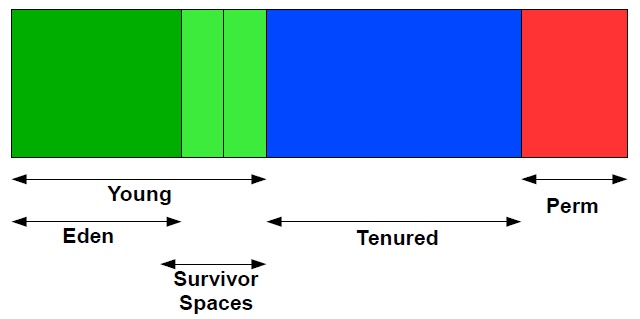
At initialization, a maximum address space is virtually reserved but not allocated to physical memory unless it is needed. The complete address space reserved for object memory can be divided into the young and tenured generations.

The young generation consists of eden plus two survivor spaces. Objects are initially allocated in eden. One survivor space is empty at any time, and serves as a destination of the next, copying collection of any live objects in eden and the other survivor space. Objects are copied between survivor spaces in this way until they are old enough to be tenured, or copied to the tenured generation.
Other virtual machines, including the production virtual machine for the J2SE Platform version 1.2 for the Solaris Operating System, used two equally sized spaces for copying rather than one large eden plus two small spaces. This means the options for sizing the young generation are not directly comparable.


A third generation closely related to the tenured generation is the permanent generation. The permanent generation is special because it holds data needed by the virtual machine to describe objects that do not have an equivalence at the Java language level. For example objects describing classes and methods are stored in the permanent generation.

Tuesday, August 10, 2010

JAVA EVENT DELEGATION MODEL

10:09:00 PM Posted by Satish , , , , 4 comments
Event broadcasting sytem in java  called as EVENT DELEGATION MODEL. This model is based on the Event Source and Event Listeners. Event Listener is an object that receives the message/ events. The Event Source is any object which creates the message/ event. The Event Delegation Model is based on the following things.
  • Event Source - This class which broadcasts the events.
  • Event Listeners - The classes which receive notifications of events. The Event Listeners are implemented to Adapter classes for the default action for a particular event. The API user is free to override the Adapter version of the method. The event listeners should extend the java.util.EventListener interface.
  • Event Object - The object which describes the event. The event object class should extend java.util.EventObject class.
  • Event Manager - This is the class which manages the relationship between the event and listeners. This class will register and de-register the listeners for a particular event.
The following picture explains how the event model works.


Now time to look at the programming implementation.

Event Class:

1
2
3
4
5
6
7
8
import java.util.EventObject;

//Declare the event. It must extend EventObject.
public class MyEvent extends EventObject {
    public MyEvent(Object source) {
        super(source);
    }
}

Event Listener:

1
2
3
4
5
6
7
8
9
package org.satish.event;

import java.util.EventListener;

//Declare the listener class. It must extend EventListener.
//A class must implement this interface to get MyEvents.
public interface MyEventListener extends EventListener {
    public void myEventOccurred(MyEvent evt);
}

Event Manager:

 1
 2
 3
 4
 5
 6
 7
 8
 9
10
11
12
13
14
15
16
17
18
19
20
21
22
23
24
25
26
27
28
29
30
31
32
package org.satish.event;

import java.util.ArrayList;
import java.util.List;

//Add the event registration and notification code to a class. 
public class EventManager {
    // Create the listener list
    protected List listenerList = new ArrayList();

    // This methods allows classes to register for MyEvents
    public void addMyEventListener(MyEventListener listener) {
        listenerList.add(listener);
    }

    // This methods allows classes to unregister for MyEvents
    public void removeMyEventListener(MyEventListener listener) {
        listenerList.remove(listener);
    }

    // This method is used to fire MyEvents
    void fireMyEvent(MyEvent evt) {
        System.out.println("Got the event." + listenerList.size());
        // Iterate the Listener list to fire the implemented method of each
        // listener.
        for (MyEventListener myEventListener : listenerList) {
            System.out
                    .println("Firing listener method for each of the listener.");
            myEventListener.myEventOccurred(evt);
        }
    }
}

Event Source:

 1
 2
 3
 4
 5
 6
 7
 8
 9
10
11
12
13
14
15
16
17
18
19
20
21
22
23
24
25
26
27
package org.satish.event;

public class EventGenerator implements Runnable{
    
    Thread t;
    EventManager c;
    public EventGenerator(EventManager c) {
        // TODO Auto-generated constructor stub
        this.c = c;
        t =  new Thread(this, "Event Generator");
        t.start();
    }
    @Override
    public void run() {
        // TODO Auto-generated method stub
        System.out.println("Event generator in the run method.");
        while(true){
            System.out.println("Generate a event.");
            c.fireMyEvent(new MyEvent(this));
            try {
                Thread.sleep(1000);
            } catch (InterruptedException e) {
                // TODO: handle exception
            }
        }
    }
}

Demo Starter:


 1
 2
 3
 4
 5
 6
 7
 8
 9
10
11
12
13
14
15
16
17
18
19
20
21
22
23
24
25
26
27
28
29
30
31
32
33
package org.satish.event;

public class EventDemo {
    public static void main(String[] args) {

        EventManager c = new EventManager();

        // Event Generator is instantiated to generate the events.
        EventGenerator eventGenerator = new EventGenerator(c);
        System.out.println("Event generator started.");

        // Register for MyEvents from c
        // Here the object of MyEventListener is been created, implementing the
        // interface method. Developers are free to user the Adapter class
        // object or use their own implementation class object.
        c.addMyEventListener(new MyEventListener() {
            public void myEventOccurred(MyEvent evt) {
                // MyEvent was fired
                System.out.println("1st Event Fired");
            }
        });
        System.out.println("First event is registered.");

        // Register another event
        c.addMyEventListener(new MyEventListener() {
            public void myEventOccurred(MyEvent evt) {
                // MyEvent was fired
                System.out.println(" 2nd Event Fired");
            }
        });
        System.out.println("Second event is registered.");
    }
}


This is the basic implementation of event delegation model. In a multi threaded environment, where more than one listener are registered to each event and the generation of event is quite fast, then you need to change your design to deal with the requirement.

Source Code:

Complete source code you can fork from GitHub.