A Technology Blog About Code Development, Architecture, Operating System, Hardware, Tips and Tutorials for Developers.

Showing posts with label METRO. Show all posts

Wednesday, December 5, 2012

SOAP (JAX-WS) Web Service


JAX-WS stands for Java API for XML Web Services. JAX-WS is a technology for building web services and clients that communicate using XML. JAX-WS allows developers to write message-oriented as well as RPC-oriented web services.

In JAX-WS, a web service operation invocation is represented by an XML-based protocol such as SOAP. The SOAP specification defines the envelope structure, encoding rules, and conventions for representing web service invocations and responses. These calls and responses are transmitted as SOAP messages (XML files) over HTTP.

Although SOAP messages are complex, the JAX-WS API hides this complexity from the application developer. On the server side, the developer specifies the web service operations by defining methods in an interface written in the Java programming language. The developer also codes one or more classes that implement those methods. Client programs are also easy to code. A client creates a proxy (a local object representing the service) and then simply invokes methods on the proxy. With JAX-WS, the developer does not generate or parse SOAP messages. It is the JAX-WS runtime system that converts the API calls and responses to and from SOAP messages.

With JAX-WS, clients and web services have a big advantage: the platform independence of the Java programming language. In addition, JAX-WS is not restrictive: a JAX-WS client can access a web service that is not running on the Java platform, and vice versa. This flexibility is possible because JAX-WS uses technologies defined by the World Wide Web Consortium (W3C): HTTP, SOAP, and the Web Service Description Language (WSDL). WSDL specifies an XML format for describing a service as a set of endpoints operating on messages.
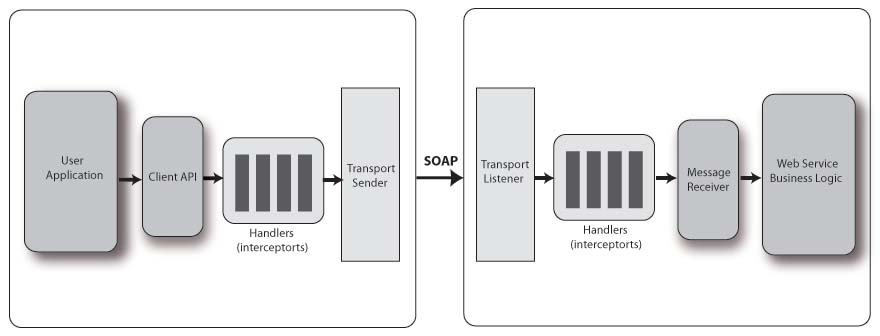

I suggest to read the following two article before start learing the JAX-WS (SOAP) web service. I wrote these articles keeping in mind atleast you get a over all idea of web service.

Before Learning Java Web Service

XML Parsing using Java

1. JAX-WS (SOAP) Web Services:

1.1 Web Service using JAX-WS (RPC Style)

1.2 Web Service using JAX-WS (Document Style)

1.3 RPC-style vs Document-Style Web Service

1.4 Web Service using JAX-WS (MTOM)

2. Web Integration:

2.1 JAX-WS Web Integration (Glassfish Metro)

2.2 JAX-WS Web Integration (Apache Axis2)

3. Web Service Client:

3.1 Web Service Client

4. Web Service Handler:

4.1 JAX-WS Web Service Handler (Server)

4.2 JAX-WS Web Service Handler (Client)

4.3 JAX-WS Web Service with Spring

5. Problems And Tips:

5.1 Have you run APT to generate them?

5.2 Embedded error: com/sun/mirror/apt/AnnotationProce...

5.3 Cannot construct org.apache.maven.plugin.war.util....

5.4 annotations are not supported in -source 1.3


6. References:

6.1 http://jax-ws.java.net/
6.2 http://wso2.org/library/
6.3 http://javajazzup.com/
6.4 http://axis.apache.org/
6.5 http://www.mkyong.com/
6.6 http://www.vogella.com/
6.7 http://jax-ws.java.net/


Tuesday, December 4, 2012

JAX-WS Web Service with Spring

10:11:00 PM Posted by Satish , , , , , , , , No comments
I am going to demonstrate how to create a web service with Spring. For this tutorial I will be using the following tool.
  • JDK 7
  • Eclipse Juno
  • Maven2
  • Tomcat 7
Before start coding let's create a java project using the following maven command.

1
mvn archetype:generate -DgroupId=com.techiekernel -DartifactId=webservice-JAX-WS-Spring -Dpackagename=com.techiekernel -DarchetypeArtifactId=maven-archetype-webapp

After you execute, the project will be get created with pom.xml file. As I am using JDK 7 and annotations, I have to specify the updated maven plugin. And I have to specify the dependency for GlassFish Metro and Spring . So the final pom.xml is shown bellow.

 1
 2
 3
 4
 5
 6
 7
 8
 9
10
11
12
13
14
15
16
17
18
19
20
21
22
23
24
25
26
27
28
29
30
31
32
33
34
35
36
37
38
39
40
41
42
43
44
45
46
47
48
49
50
51
52
53
54
55
56
57
58
59
60
61
62
63
64
65
66
67
68
69
70
71
72
73
74
75
76
77
78
79
80
81
<project xmlns="http://maven.apache.org/POM/4.0.0" xmlns:xsi="http://www.w3.org/2001/XMLSchema-instance"
  xsi:schemaLocation="http://maven.apache.org/POM/4.0.0 http://maven.apache.org/maven-v4_0_0.xsd">
  <modelVersion>4.0.0</modelVersion>
  <groupId>com.techiekernel</groupId>
  <artifactId>webservice-JAX-WS-Spring</artifactId>
  <packaging>war</packaging>
  <version>1.0-SNAPSHOT</version>
  <name>webservice-JAX-WS-Web Maven Webapp</name>
  <url>http://maven.apache.org</url>

  <repositories>
    <repository>
      <id>java.net</id>
      <url>http://download.java.net/maven/2</url>
    </repository>
  </repositories>

  <dependencies>

    <dependency>
      <groupId>junit</groupId>
      <artifactId>junit</artifactId>
      <version>3.8.1</version>
      <scope>test</scope>
    </dependency>

    <!-- Spring framework -->
    <dependency>
      <groupId>org.springframework</groupId>
      <artifactId>spring</artifactId>
      <version>2.5.6</version>
    </dependency>

    <!-- JAX-WS -->
    <dependency>
      <groupId>com.sun.xml.ws</groupId>
      <artifactId>jaxws-rt</artifactId>
      <version>2.2.3</version>
    </dependency>

    <!-- Library from java.net, integrate Spring with JAX-WS -->
    <dependency>
      <groupId>org.jvnet.jax-ws-commons.spring</groupId>
      <artifactId>jaxws-spring</artifactId>
      <version>1.8</version>
      <exclusions>
        <exclusion>
          <groupId>org.springframework</groupId>
          <artifactId>spring-core</artifactId>
        </exclusion>
        <exclusion>
          <groupId>org.springframework</groupId>
          <artifactId>spring-context</artifactId>
        </exclusion>
        <exclusion>
          <groupId>com.sun.xml.stream.buffer</groupId>
          <artifactId>streambuffer</artifactId>
        </exclusion>
        <exclusion>
          <groupId>org.jvnet.staxex</groupId>
          <artifactId>stax-ex</artifactId>
        </exclusion>
      </exclusions>
    </dependency>

  </dependencies>
  <build>
    <plugins>
      <plugin>
        <groupId>org.apache.maven.plugins</groupId>
        <artifactId>maven-compiler-plugin</artifactId>
        <version>2.3.1</version>
        <configuration>
          <source>1.6</source>
          <target>1.6</target>
        </configuration>
      </plugin>
    </plugins>
    <finalName>webservice-JAX-WS-Spring</finalName>
  </build>
</project>

We are going to do the following thing in this tutorial.
  • Web Service End Point
  • Service Interface and Class
  • Front Controller Configuration
  • Spring Mapping for web service and Service Integration
Web Service End Point:

We are going to create a web service end point class and create a member of service interface to get the object injected by the spring.

 1
 2
 3
 4
 5
 6
 7
 8
 9
10
11
12
13
14
15
16
17
18
19
20
21
22
23
24
25
26
27
package com.techiekernel.ws.jaxws;

import javax.jws.WebMethod;
import javax.jws.WebService;

import com.techiekernel.ws.jaxws.document.FooBar;
import com.techiekernel.ws.jaxws.document.Server;

@WebService
public class FooBarWebService {
  private FooBar fooBar;

  @WebMethod(exclude=true)
  public void setFooBar(FooBar fooBar) {
    this.fooBar = fooBar;
  }
  
  @WebMethod(operationName="callFooBar")
  public String callFooBar(String name){
    return fooBar.callFooBar(name);
  }
  
  @WebMethod(operationName="getServerDetail")
  public Server getServerDetail(String client){
    return fooBar.getServerDetail(client);
  }
}

Service Interface and Class:

 1
 2
 3
 4
 5
 6
 7
 8
 9
10
11
12
package com.techiekernel.ws.jaxws.document;

/**
 * Service end point interface
 * @author satish
 *
 */
public interface FooBar {
  String callFooBar(String name);
  
  Server getServerDetail(String client);
}

 1
 2
 3
 4
 5
 6
 7
 8
 9
10
11
12
13
14
15
16
17
18
19
20
21
package com.techiekernel.ws.jaxws.document;


public class FooBarImpl implements FooBar{

  public String callFooBar(String name) {
    // TODO Auto-generated method stub
    return "FooBar called by " + name;
  }

  public Server getServerDetail(String client) {
    // TODO Auto-generated method stub
    Server server = new Server();
    server.setName("Techie Kernel");
    server.setIp("192.168.1.0");
    server.setMac("12-75-61-09-12-22");
    server.setOs("Ubuntu");
    return server;
  }
}

As one of the WebMethod is returning a instance of Server. we have to create the following Server class.

 1
 2
 3
 4
 5
 6
 7
 8
 9
10
11
12
13
14
15
16
17
18
19
20
21
22
23
24
25
26
27
28
29
30
31
32
33
34
35
36
37
package com.techiekernel.ws.jaxws.document;

public class Server {
  private String name;
  private String ip;
  private String mac;
  private String os;
  public String getName() {
    return name;
  }
  public void setName(String name) {
    this.name = name;
  }
  public String getIp() {
    return ip;
  }
  public void setIp(String ip) {
    this.ip = ip;
  }
  public String getMac() {
    return mac;
  }
  public void setMac(String mac) {
    this.mac = mac;
  }
  public String getOs() {
    return os;
  }
  public void setOs(String os) {
    this.os = os;
  }
  @Override
  public String toString() {
    return "Server [name=" + name + ", ip=" + ip + ", mac=" + mac + ", os="
        + os + ", toString()=" + super.toString() + "]";
  }
}

Front Controller Configuration:

We have to configure the front controller in web.xml file and the deployment descriptor looks some thing like this after that.

 1
 2
 3
 4
 5
 6
 7
 8
 9
10
11
12
13
14
15
16
17
18
19
20
21
22
23
<!DOCTYPE web-app PUBLIC
 "-//Sun Microsystems, Inc.//DTD Web Application 2.3//EN"
 "http://java.sun.com/dtd/web-app_2_3.dtd" >

<web-app>
  <display-name>webservice-JAX-Spring</display-name>
  <listener>
    <listener-class>
      org.springframework.web.context.ContextLoaderListener
    </listener-class>
  </listener>
  <servlet>
    <servlet-name>jaxws-servlet</servlet-name>
    <servlet-class>
      com.sun.xml.ws.transport.http.servlet.WSSpringServlet
    </servlet-class>
  </servlet>

  <servlet-mapping>
    <servlet-name>jaxws-servlet</servlet-name>
    <url-pattern>/foobar</url-pattern>
  </servlet-mapping>
</web-app>

Spring Mapping for web service and Service Integration:

We have to create applicationContext.xml in class path with all the bean definitions. So that spring will read the configuration to provide the infrastructure.

 1
 2
 3
 4
 5
 6
 7
 8
 9
10
11
12
13
14
15
16
17
18
19
20
21
22
23
24
25
26
27
<?xml version="1.0" encoding="UTF-8"?>
<beans xmlns="http://www.springframework.org/schema/beans"
       xmlns:xsi="http://www.w3.org/2001/XMLSchema-instance"
       xmlns:ws="http://jax-ws.dev.java.net/spring/core"
       xmlns:wss="http://jax-ws.dev.java.net/spring/servlet"
       xsi:schemaLocation="http://www.springframework.org/schema/beans
       http://www.springframework.org/schema/beans/spring-beans-2.5.xsd
       http://jax-ws.dev.java.net/spring/core
        http://jax-ws.dev.java.net/spring/core.xsd
        http://jax-ws.dev.java.net/spring/servlet
        http://jax-ws.dev.java.net/spring/servlet.xsd"
>
 
    <wss:binding url="/foobar">
        <wss:service>
            <ws:service bean="#fooBarWs"/>
        </wss:service>
    </wss:binding>
 
    <!-- Web service methods -->
    <bean id="fooBarWs" class="com.techiekernel.ws.jaxws.FooBarWebService">
      <property name="fooBar" ref="fooBar" />
    </bean>
 
    <bean id="fooBar" class="com.techiekernel.ws.jaxws.document.FooBarImpl" />
 
</beans>

Now it's time to deploy the application in tomcat. After deployment, we can access the WSDL with the following URL.


1
http://localhost:8080/webservice-JAX-WS-Spring/foobar?wsdl


Source Code:

You can pull the source code from GitHub.

JAX-WS Web Service Handler (Client)

6:35:00 PM Posted by Satish , , , , , , No comments
SOAP handler is a SOAP message interceptor, which is able to intercept incoming or outgoing SOAP message and manipulate its values. For example, attach a SOAP handler in client side, which will inject authentication credential into the SOAP header block for every outgoing SOAP message that is send by the client. In server side, attach another SOAP handler, to retrieve back the authentication credential in SOAP header block from every incoming SOAP message. In this way we can validate the incoming requests and secure our system. In this article we are going inject the authentication credential in header to access the web service. We are going to create the client to access the service explained in my previous article  JAX-WS Web Service Handler (Server).

For this tutorial I will be using the following tools
  • JDK 7
  • Eclipse Juno
In this article, I will show you how to create a SOAP handler, to inject the credential in SOAP header block for every outgoing SOAP message to access the web service we created in JAX-WS Web Service Handler (Server). We are going to do the following thing here.
  • Create the client for the web service
  • Create SOAP Handler
  • Handler Configuration
  • Handler Mapping
  • Tracing the out going and incoming messages in success and failure case.
Create Web Service:

As I have already wrote an article to demonstrate how to  create web service client, I will not be explaining it again . Please refer Web Service Client to import and create web service client.

Create Soap Handler:

In order to create a SOAP handler, we have to implement javax.xml.ws.handler.soap.SOAPHandler, same way we did while writing handler for end point at server. We have to give implementation in handleMessage(). In this method we are going to populate the header with authentication credentials.

 1
 2
 3
 4
 5
 6
 7
 8
 9
10
11
12
13
14
15
16
17
18
19
20
21
22
23
24
25
26
27
28
29
30
31
32
33
34
35
36
37
38
39
40
41
42
43
44
45
46
47
48
49
50
51
52
53
54
55
56
57
58
59
60
61
62
63
64
65
66
67
68
69
70
71
72
73
74
75
76
77
78
79
80
81
82
83
84
85
86
87
88
89
90
91
package com.techiekernel.ws.jaxws.handler;

import java.io.IOException;
import java.net.InetAddress;
import java.net.NetworkInterface;
import java.net.SocketException;
import java.net.UnknownHostException;
import java.util.Set;
import javax.xml.namespace.QName;
import javax.xml.soap.SOAPConstants;
import javax.xml.soap.SOAPEnvelope;
import javax.xml.soap.SOAPException;
import javax.xml.soap.SOAPHeader;
import javax.xml.soap.SOAPHeaderElement;
import javax.xml.soap.SOAPMessage;
import javax.xml.ws.handler.MessageContext;
import javax.xml.ws.handler.soap.SOAPHandler;
import javax.xml.ws.handler.soap.SOAPMessageContext;

public class CredentialProvider implements SOAPHandler<SOAPMessageContext> {

 private static final String USER_NAME = "foo";
 private static final String PASSWORD = "bar";
 
 public boolean handleMessage(SOAPMessageContext context) {

  System.out.println("handleMessage() called.");

  Boolean isRequest = (Boolean) context
    .get(MessageContext.MESSAGE_OUTBOUND_PROPERTY);

  // if this is a request, true for outbound messages, false for inbound
  if (isRequest) {

   try {
    SOAPMessage soapMsg = context.getMessage();
    SOAPEnvelope soapEnv = soapMsg.getSOAPPart().getEnvelope();
    SOAPHeader soapHeader = soapEnv.getHeader();

    // if no header, add one
    if (soapHeader == null) {
     soapHeader = soapEnv.addHeader();
    }

    // add a soap header, username
    QName qnameUser = new QName("http://document.jaxws.ws.techiekernel.com/", "userName");
    SOAPHeaderElement soapHeaderElementUser = soapHeader
      .addHeaderElement(qnameUser);

    soapHeaderElementUser.setActor(SOAPConstants.URI_SOAP_ACTOR_NEXT);
    soapHeaderElementUser.addTextNode(USER_NAME);
    
    // add a soap header, username
    QName qnamePassword = new QName("http://document.jaxws.ws.techiekernel.com/", "password");
    SOAPHeaderElement soapHeaderElementPassword = soapHeader
      .addHeaderElement(qnamePassword);

    soapHeaderElementPassword.setActor(SOAPConstants.URI_SOAP_ACTOR_NEXT);
    soapHeaderElementPassword.addTextNode(PASSWORD);
    
    soapMsg.saveChanges();

    // tracking
    soapMsg.writeTo(System.out);

   } catch (SOAPException e) {
    System.err.println(e);
   } catch (IOException e) {
    System.err.println(e);
   }

  }

  // continue other handler chain
  return true;
 }

 public boolean handleFault(SOAPMessageContext context) {
  System.out.println("handleFault() called.");
  return true;
 }

 public void close(MessageContext context) {
  System.out.println("close() called");
 }

 public Set<QName> getHeaders() {
  System.out.println("getHeaders() called.");
  return null;
 }
}

Handler Configuration:

Let’s create define the handler in a handler mapping file and name it as handler.xml.

 1
 2
 3
 4
 5
 6
 7
 8
 9
10
<?xml version="1.0" encoding="UTF-8" standalone="yes"?>
<javaee:handler-chains 
     xmlns:javaee="http://java.sun.com/xml/ns/javaee" 
     xmlns:xsd="http://www.w3.org/2001/XMLSchema">
  <javaee:handler-chain>
    <javaee:handler>
      <javaee:handler-class>com.techiekernel.ws.jaxws.handler.CredentialProvider</javaee:handler-class>
    </javaee:handler>
  </javaee:handler-chain>
</javaee:handler-chains>

Handler Mapping:

While importing the WSLD, some stubs will be get created at the client. To attach above SOAP handler, just annotate the service class with @HandlerChain and specify the SOAP handler file name inside. In our case following class we have to consider. We have to keep the hander configuration file i.e. handler.xml in the class path.

 1
 2
 3
 4
 5
 6
 7
 8
 9
10
11
12
13
14
15
16
17
18
19
20
21
22
23
24
25
26
27
28
29
30
31
32
33
34
35
36
37
38
39
40
41
42
43
44
45
46
47
48
49
50
51
52
53
54
55
56
57
58
59
60
61
62
63
64
65
66
67
68
69
70
71
72
package com.techiekernel.ws.jaxws.document;

import java.net.MalformedURLException;
import java.net.URL;
import java.util.logging.Logger;
import javax.xml.namespace.QName;
import javax.xml.ws.Service;
import javax.xml.ws.WebEndpoint;
import javax.xml.ws.WebServiceClient;
import javax.xml.ws.WebServiceFeature;
import javax.jws.HandlerChain;


/**
 * This class was generated by the JAX-WS RI.
 * JAX-WS RI 2.1.7-b01-
 * Generated source version: 2.1
 * 
 */
@WebServiceClient(name = "FooBarImplService", targetNamespace = "http://document.jaxws.ws.techiekernel.com/", wsdlLocation = "http://localhost:8080/webservice-JAX-WS-handler/foobar?wsdl")
@HandlerChain(file="handler.xml")
public class FooBarImplService
    extends Service
{

    private final static URL FOOBARIMPLSERVICE_WSDL_LOCATION;
    private final static Logger logger = Logger.getLogger(com.techiekernel.ws.jaxws.document.FooBarImplService.class.getName());

    static {
        URL url = null;
        try {
            URL baseUrl;
            baseUrl = com.techiekernel.ws.jaxws.document.FooBarImplService.class.getResource(".");
            url = new URL(baseUrl, "http://localhost:8080/webservice-JAX-WS-handler/foobar?wsdl");
        } catch (MalformedURLException e) {
            logger.warning("Failed to create URL for the wsdl Location: 'http://localhost:8080/webservice-JAX-WS-handler/foobar?wsdl', retrying as a local file");
            logger.warning(e.getMessage());
        }
        FOOBARIMPLSERVICE_WSDL_LOCATION = url;
    }

    public FooBarImplService(URL wsdlLocation, QName serviceName) {
        super(wsdlLocation, serviceName);
    }

    public FooBarImplService() {
        super(FOOBARIMPLSERVICE_WSDL_LOCATION, new QName("http://document.jaxws.ws.techiekernel.com/", "FooBarImplService"));
    }

    /**
     * 
     * @return
     *     returns FooBarImpl
     */
    @WebEndpoint(name = "FooBarImplPort")
    public FooBarImpl getFooBarImplPort() {
        return super.getPort(new QName("http://document.jaxws.ws.techiekernel.com/", "FooBarImplPort"), FooBarImpl.class);
    }

    /**
     * 
     * @param features
     *     A list of {@link javax.xml.ws.WebServiceFeature} to configure on the proxy.  Supported features not in the <code>features</code> parameter will have their default values.
     * @return
     *     returns FooBarImpl
     */
    @WebEndpoint(name = "FooBarImplPort")
    public FooBarImpl getFooBarImplPort(WebServiceFeature... features) {
        return super.getPort(new QName("http://document.jaxws.ws.techiekernel.com/", "FooBarImplPort"), FooBarImpl.class, features);
    }

}

Tracing SOAP Messages:

Let's first see how the SOAP message looks in case of a success interaction.

Client Request SOAP Message:

 1
 2
 3
 4
 5
 6
 7
 8
 9
10
11
12
13
14
15
<S:Envelope xmlns:S="http://schemas.xmlsoap.org/soap/envelope/">
 <S:Header>
  <userName xmlns="http://document.jaxws.ws.techiekernel.com/"
   xmlns:SOAP-ENV="http://schemas.xmlsoap.org/soap/envelope/"
   SOAP-ENV:actor="http://schemas.xmlsoap.org/soap/actor/next">foo</userName>
  <password xmlns="http://document.jaxws.ws.techiekernel.com/"
   xmlns:SOAP-ENV="http://schemas.xmlsoap.org/soap/envelope/"
   SOAP-ENV:actor="http://schemas.xmlsoap.org/soap/actor/next">bar</password>
 </S:Header>
 <S:Body>
  <ns2:callFooBar xmlns:ns2="http://document.jaxws.ws.techiekernel.com/">
   <arg0>Satish</arg0>
  </ns2:callFooBar>
 </S:Body>
</S:Envelope>

Server Response SOAP Message:

1
2
3
4
5
6
7
8
<S:Envelope xmlns:S="http://schemas.xmlsoap.org/soap/envelope/">
 <S:Header />
 <S:Body>
  <ns2:callFooBar xmlns:ns2="http://document.jaxws.ws.techiekernel.com/">
   <arg0>Satish</arg0>
  </ns2:callFooBar>
 </S:Body>
</S:Envelope>

Now let change the password to something else to check, how the handler works.

Client Request SOAP Message:

 1
 2
 3
 4
 5
 6
 7
 8
 9
10
11
12
13
14
15
<S:Envelope xmlns:S="http://schemas.xmlsoap.org/soap/envelope/">
 <S:Header>
  <userName xmlns="http://document.jaxws.ws.techiekernel.com/"
   xmlns:SOAP-ENV="http://schemas.xmlsoap.org/soap/envelope/"
   SOAP-ENV:actor="http://schemas.xmlsoap.org/soap/actor/next">foo</userName>
  <password xmlns="http://document.jaxws.ws.techiekernel.com/"
   xmlns:SOAP-ENV="http://schemas.xmlsoap.org/soap/envelope/"
   SOAP-ENV:actor="http://schemas.xmlsoap.org/soap/actor/next">bar1</password>
 </S:Header>
 <S:Body>
  <ns2:callFooBar xmlns:ns2="http://document.jaxws.ws.techiekernel.com/">
   <arg0>Satish</arg0>
  </ns2:callFooBar>
 </S:Body>
</S:Envelope>

Server Response SOAP Message:


 1
 2
 3
 4
 5
 6
 7
 8
 9
10
11
12
<S:Envelope xmlns:S="http://schemas.xmlsoap.org/soap/envelope/">
 <S:Header />
 <S:Body>
  <ns2:callFooBar xmlns:ns2="http://document.jaxws.ws.techiekernel.com/">
   <arg0>Satish</arg0>
  </ns2:callFooBar>
  <S:Fault>
   <faultcode>S:Server</faultcode>
   <faultstring>Authentication Failed</faultstring>
  </S:Fault>
 </S:Body>
</S:Envelope>


Source Code:

You can pull the code from GitHub. The shared code contains the full implementation.

JAX-WS Web Service Handler (Server)

5:56:00 PM Posted by Satish , , , , , , , No comments
SOAP handler is a SOAP message interceptor, which is able to intercept incoming or outgoing SOAP message and manipulate its values. For example, attach a SOAP handler in client side, which will inject authentication credential into the SOAP header block for every outgoing SOAP message that is send by the client. In server side, attach another SOAP handler, to retrieve back the authentication credential in SOAP header block from every incoming SOAP message. In this way we can validate the incoming requests and secure our system.

For this tutorial I will be using the following tools.
  • JDK 7
  • Eclipse Juno
  • Maven2
  • GlassFish Metro
  • Tomcat 7
In this article, I show you how to create a SOAP handler and attach it to web service, to retrieve the credential in SOAP header block from every incoming SOAP message. And do validation to allow only username as “foo” and password as “bar” to access this published service. If a request comes with an invalid credential, return a response with fault description and fault code. We are going to do the following thing here.
  • Create Web Service
  • Create SOAP Handler
  • Handler Configuration
  • Hander Mapping
Create Web Service:

As I have already wrote an article to demonstrate how to  create web service, I will not be explaining it again . Please refer JAX-WS Web Integration (Glassfish Metro) to create and deploy a web service in tomcat.

Create Soap Handler:

In order to create a SOAP handler, we have to implement javax.xml.ws.handler.soap.SOAPHandler. We have to give a logical implementation in handleMessage(). This method returns a true in case success and false in case of failure. Be very careful to return false in case of failure or else it will bypass the security and hit to the endpoint. So eventually in all cases web service will be get accessed.

  1
  2
  3
  4
  5
  6
  7
  8
  9
 10
 11
 12
 13
 14
 15
 16
 17
 18
 19
 20
 21
 22
 23
 24
 25
 26
 27
 28
 29
 30
 31
 32
 33
 34
 35
 36
 37
 38
 39
 40
 41
 42
 43
 44
 45
 46
 47
 48
 49
 50
 51
 52
 53
 54
 55
 56
 57
 58
 59
 60
 61
 62
 63
 64
 65
 66
 67
 68
 69
 70
 71
 72
 73
 74
 75
 76
 77
 78
 79
 80
 81
 82
 83
 84
 85
 86
 87
 88
 89
 90
 91
 92
 93
 94
 95
 96
 97
 98
 99
100
101
102
103
104
105
106
107
108
109
110
111
112
113
114
115
116
117
118
119
120
121
package com.techiekernel.ws.jaxws.handler;

import java.io.IOException;
import java.util.Iterator;
import java.util.Set;

import javax.xml.namespace.QName;
import javax.xml.soap.Node;
import javax.xml.soap.SOAPBody;
import javax.xml.soap.SOAPConstants;
import javax.xml.soap.SOAPEnvelope;
import javax.xml.soap.SOAPException;
import javax.xml.soap.SOAPFault;
import javax.xml.soap.SOAPHeader;
import javax.xml.soap.SOAPMessage;
import javax.xml.ws.handler.MessageContext;
import javax.xml.ws.handler.soap.SOAPHandler;
import javax.xml.ws.handler.soap.SOAPMessageContext;
import javax.xml.ws.soap.SOAPFaultException;

public class AuthenticationHandler implements SOAPHandler<SOAPMessageContext> {

         public boolean handleMessage(SOAPMessageContext context) {

                 System.out.println("handleMessage() called.");

                 Boolean isRequest = (Boolean) context
                                   .get(MessageContext.MESSAGE_OUTBOUND_PROPERTY);

                 // for request message only, true for outbound messages, false for
                 // inbound
                 if (!isRequest) {

                          try {
                                   SOAPMessage soapMsg = context.getMessage();
                                   SOAPEnvelope soapEnv = soapMsg.getSOAPPart().getEnvelope();
                                   SOAPHeader soapHeader = soapEnv.getHeader();

                                   // if no header, add one
                                   if (soapHeader == null) {
                                            soapHeader = soapEnv.addHeader();
                                            // No header found, throw exception
                                            embedSOAPException(soapMsg, "Missing Header", "ERR:001");
                                   }

                                   // Get user Id and password from SOAP header
                                   Iterator<Node> it = soapHeader
                                                     .extractHeaderElements(SOAPConstants.URI_SOAP_ACTOR_NEXT);

                                   // if no header block for next actor found? throw exception
                                   if (it == null || !it.hasNext()) {
                                            embedSOAPException(soapMsg, "No Header Data", "ERR:002");
                                   }

                                   String userName = null;
                                   String password = null;

                                   while (it.hasNext()) {
                                            Node node = it.next();
                                            if (node != null && node.getNodeName().equals("userName"))
                                                    userName = node.getValue();
                                            if (node != null && node.getNodeName().equals("password"))
                                                    password = node.getValue();
                                   }

                                   if (userName == null || password == null) {
                                            embedSOAPException(soapMsg, "No userName or password.",
                                                             "ERR:003");
                                   }

                                   // the auth code
                                   if (!userName.equals("foo") || !password.equals("bar")) {
                                            embedSOAPException(soapMsg, "Authentication Failed",
                                                             "ERR:004");
                                   }

                                   // tracking
                                   soapMsg.writeTo(System.out);

                          } catch (SOAPException e) {
                                   System.err.println(e);
                                   return false;
                          } catch (IOException e) {
                                   System.err.println(e);
                                   return false;
                          }

                 }

                 // continue other handler chain
                 return true;
         }

         public boolean handleFault(SOAPMessageContext context) {

                 System.out.println("handleFault() called.");

                 return true;
         }

         public void close(MessageContext context) {
                 System.out.println("close() called");
         }

         public Set<QName> getHeaders() {
                 System.out.println("getHeaders() called");
                 return null;
         }

         private void embedSOAPException(SOAPMessage msg, String reason,
                          String faultCode) throws SOAPException, IOException {
                 SOAPBody soapBody = msg.getSOAPPart().getEnvelope().getBody();
                 SOAPFault soapFault = soapBody.getFault();
                 if (soapFault == null)
                          soapFault = soapBody.addFault();
                 soapFault.setFaultString(reason);
                 soapFault.setFaultCode(faultCode);
                 msg.writeTo(System.out);
         }

}

Handler Configuration:

Let’s create define the handler in a handler mapping file and name it as handler.xml.

 1
 2
 3
 4
 5
 6
 7
 8
 9
10
11
12
13
14
15
16
17
18
19
<?xml version="1.0" encoding="UTF-8" standalone="yes"?>

<javaee:handler-chains xmlns:javaee="http://java.sun.com/xml/ns/javaee"

         xmlns:xsd="http://www.w3.org/2001/XMLSchema">

         <javaee:handler-chain>

                 <javaee:handler>

                          <javaee:handler-class>com.techiekernel.ws.jaxws.handler.AuthenticationHandler

                          </javaee:handler-class>

                 </javaee:handler>

         </javaee:handler-chain>

</javaee:handler-chains>

Handler Mapping:

To attach above SOAP handler to web service FooBarImpl.java, just annotate with @HandlerChain and specify the SOAP handler file name inside. We have to keep the hander configuration file i.e. handler.xml in the class path.

 1
 2
 3
 4
 5
 6
 7
 8
 9
10
11
12
13
14
15
16
17
18
19
20
21
22
23
24
25
26
27
28
29
30
31
32
33
34
35
36
37
38
39
40
41
42
43
44
45
46
47
package com.techiekernel.ws.jaxws.document;


import javax.jws.WebMethod;

import javax.jws.WebService;

import javax.jws.HandlerChain;


@WebService
@HandlerChain(file="handler.xml")
public class FooBarImpl{


         public String callFooBar(String name) {

                 // TODO Auto-generated method stub

                 return "FooBar called by " + name;

         }


         public Server getServerDetail(String client) {

                 // TODO Auto-generated method stub

                 Server server = new Server();

                 server.setName("Techie Kernel");

                 server.setIp("192.168.1.0");

                 server.setMac("12-75-61-09-12-22");

                 server.setOs("Ubuntu");

                 return server;

         }

}

Now We are ready to deploy the application to the tomcat container.

Source Code:

You can pull the complete code from GitHub. The shared code contains handler code along with the web services.